
Systems Integration Services: No-Code & API
Your CRM connected to the other systems you run, so data is entered once and lands in the right place.
Growth Geyser connects HubSpot, ActiveCampaign, Attio and Pipedrive to billing, e-signature, forms and product data, for B2B teams of 10-100 employees.
Native first, Zapier second, direct API when they fall short.
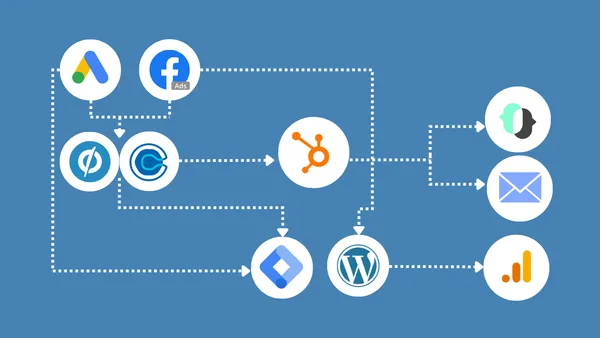
What we hear on discovery calls
“Whenever we're sending anything, I have to manually update those contact records.”
“The entire process is a mess because you have two tools and you need to manage all the...”
No-Code & API Integrations: Automate and Connect Your Business
Three ways to connect two systems. We use the cheapest one that does the job.
- 1
Native connector
The integration your tools already ship with. Free or cheap, and sometimes stronger than anything else. We check that it moves the fields you actually need.
- 2
Zapier
When the native connector is too weak or does not exist. Most of our integration work lives here. Built in your own Zapier account. See No-Code Automation.
- 3
Direct API
When neither can do the job. No limits: it does exactly what you need. It still costs more than the first two and takes more care to maintain, but it is far more affordable than it used to be, and often the better option.
Why we reach for code more often now
Zapier's builder is like Lego. It is quick, but you can only build with the pieces in the box. Code is like clay: it takes any shape the job needs.
Clay used to be slow and expensive to shape, so direct API work was the last resort. That has changed. It is still more work than a Zapier builder step and needs more care to maintain, but it now costs far less than it did, and it has no builder limits.
So more of our integrations are now written as code, usually running inside Zapier where you can still see every run.
A booking-to-CRM Zap that would have needed about 13 builder steps runs as one Python step. One thing to test, one place to look when something changes.
What code can do that the Zapier builder cannot
Reach what Zapier does not expose
Custom objects, extra fields and endpoints that Zapier's connector leaves out. If the platform's API offers it, we can use it.
Catch triggers Zapier cannot see
“No activity for 60 days” is not a Zapier trigger. Your CRM spots the condition, fires a webhook, and the automation takes it from there.
Find the right record before it writes
Search by email, then phone, then create only if nothing matches. Duplicate prevention that would take a dozen builder steps is a few readable lines.
Turn messy input into clean records
Parse a lead notification email, a form payload or a spreadsheet row into the exact fields your CRM expects.
Replace a paid connector
When an add-on exists only to sync one record type, the platform's own API can often do the same job, so the add-on can go.
Handle volume properly
Page through every record, respect rate limits and retry safely, instead of silently stopping at the first 100 results.
The hybrid: a Zapier trigger with a direct API step
Most of our API work runs inside Zapier. Zapier catches the event. A Python step calls the other system's API directly, with your API key.
- No builder limits, full Zapier visibility. Anything the API allows, with every run and every failure in your own Zapier history.
- One readable step, not fifteen. Lookups, matching and formatting live in one piece of code instead of a chain of builder steps that can break silently.
- Nothing extra to host. No server, no separate app. It runs where the rest of your automation already runs.
Every booked call becomes the right deal
A booking finds the person by email, then by phone, and creates or updates their deal. A second step caps how many calls each closer takes in one time slot.
Marketplace leads filed automatically
Lead notifications from an equipment marketplace are parsed into Pipedrive leads with the right person, source and details, and every outcome is logged.
Orders written through HubSpot's own API
Book orders reach HubSpot as order records without the paid add-on that used to sync them.
Training records Zapier cannot reach
Form submissions are matched to the right training record in a custom object, which Zapier's ActiveCampaign connector does not expose.
Stale leads flagged to the right person
Attio spots a lead sitting in one stage for 60 days and fires a webhook. Zapier turns it into a Slack message for the team member who owns it.
We run our own business this way
Call transcripts come straight from Fireflies' API into Dropbox. Upwork transactions are pulled from its API daily, sorted and de-duplicated for our bookkeeping.
Why integrations cost more than CRM work
- No two are alike. Every pair of systems has its own fields, limits and quirks, so each one is scoped on its own.
- The risky part is named up front. We tell you which piece is most likely to take longer before you commit.
- Sometimes the answer is not to integrate. If two systems share five pieces of information, a build may cost more than it saves. We will say so.
- Fewer connections, fewer failures. Using your CRM's own forms, instead of a form tool connected through Zapier, removes a link that can break.
Matching records between systems
Many broken integrations are a matching problem, not a connection problem. The data arrives, but on the wrong record, or on a new duplicate.
- Match on a unique ID, never a name. “ABC Co” and “ABC Corporation” are the same company to you, and two companies to a computer.
- Look up before you create. Every record is searched for first, so a sync does not make duplicates.
- Stop rather than guess. No match, or more than one? The integration stops and flags it instead of updating the wrong record.
- A field map both sides sign off. Which field goes where, agreed in writing before anything syncs.
What we have connected
A purchase marks the deal won
And stops, rather than guesses, when there is no deal, more than one, or a different email.
A separate e-signature tool retired
Quotes signed inside HubSpot instead, about 50 a month, with one less system to pay for and connect.
Donor records synced for email
New donors flow across and are tagged for segments. Older history was filled in behind the go-live date.
Looping Zaps replaced
Two Zaps that kept triggering each other swapped for the native connector.
And when Zapier is not needed at all:
All API, no Zapier
Events from the client's own platform create deals in HubSpot and move them through the pipeline, matched to the right company by its unique account ID, with every event logged so any sync can be traced.
How we build API integrations
- 1Read the API firstWhat the platform lets in and out, its limits, and whether a read-only key is available. Nothing is scoped until we know.
- 2A read-only key where possibleWe look before we touch. Some platforms, such as ActiveCampaign, only issue full-access keys, and we tell you when that is the case.
- 3Test on a handful of recordsA few real records end to end, checked by hand, before anything runs on the rest.
- 4Errors that explain themselvesEvery step reports which stage failed and what to check, so a problem can be fixed from the Zapier run history without guesswork.
- 5No secrets in the logsKeys and tokens are stripped from anything written to the run history.
- 6A copy of the code you can keepThe code in each step is kept as a file, so it can be reviewed, compared and restored if someone edits the Zap.
Honest limits
Some platforms only talk one way
A few can send data out but not receive it, which changes how the integration has to be built.
Some connections need a paid plan
Webhooks and premium apps such as Salesforce need a paid Zapier plan, and some CRM features need a higher tier. We tell you before we build.
A trigger fires once
“Added to a list” will not fire for someone already on it. We test with real records, not just new ones.
Native is not always enough
A built-in connector can look complete and still skip the fields you need. We check before you rely on it.
API steps need looking after
When a vendor changes its API, the step that calls it may need updating. Each one reports which stage failed and what to check, so a fix is quick.
Not every system has an open API
Some vendors limit what their API exposes, or charge for access. We check what yours allows before we scope anything.
Where this fits with our other services
Frequently asked questions
Native, Zapier or API: which do we need?+−
Start with the native connector your tools already offer, and check whether it moves the fields you need. If it does not, Zapier usually can. When neither can, a direct API integration can do anything. It costs more to build and maintain than the first two, though far less than it used to, and we often run it inside Zapier as a Python step.
Why do integrations cost more than CRM work?+−
Because no two are alike. Every pair of systems has its own fields, limits and quirks, so each integration is scoped on its own, and we tell you up front which part is most likely to take longer.
Whose Zapier account is it?+−
Yours. We build in your own accounts, connected with your own logins, so you own everything we build and keep it if we ever stop working together.
Do we need a developer on our team?+−
No. We write, test and document the code. Your team needs only a Zapier login to see every run, and the code in each step is kept as a file you own.
Is it safe to give you an API key?+−
We ask for a read-only key wherever the platform offers one, keep keys inside your own Zapier account, and strip them from anything written to the run history. When a platform only issues full-access keys, we tell you before you share one.
What happens when an integration breaks?+−
You hear about it. We build each integration to stop rather than guess when the data does not match, and to say which step failed and what to check. Where it runs in Zapier, anyone with a login to your account can see the failed run.
Let’s Solve Your CRM Challenges Together
Tell us which systems you run and where your team re-types data today. We will tell you which rung of the ladder each connection needs, and whether it is worth building at all.
Book Your Free Discovery CallA short form first, then you pick a time on the next screen.